Using Your Smartphone as a Digital Angle Gauge
George Vondriska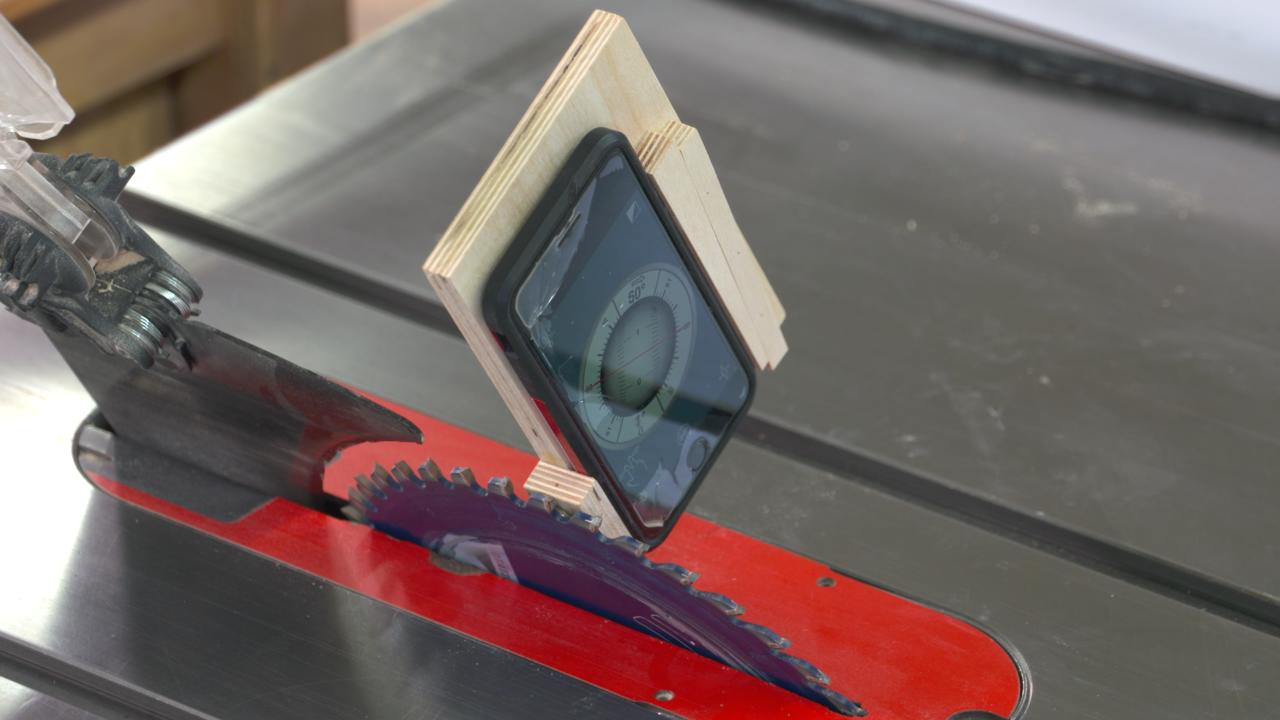
Setting angles on your tools can be a little tricky, and getting the angles just right is very important. If you’re doing something like stave construction, or any multi-sided item, being off just a few degrees on the set up can lead to disastrous results. But if you own a smart phone, the answer for accurately setting angles is at your fingertips.
Start with an App
Your phone on its own won’t be much help. You need to add an app that’s designed for reading angles. The app we’re using on an iPhone in this video is called Rotating Sphere Clinometer. If that specific app isn’t available for your device, there are lots of other angle reading apps out there. Get one for your phone.
Build a Jig
We need a very simple jig. The jig acts as a fixture that will hold your phone, and it also needs to have rare earth magnets on it that will secure the jig to your saw table and saw blade. Each jig will be a little different, depending on your phone, but some tips for making the jig are provided in the video.
Using Your Gauge
Once you’ve got the app and have built the jig, using your setup is easy. Zero the angle gauge to your table, then place the jig on your saw blade (with the saw unplugged) to determine the angle of the blade. Easy peezy.
Your Phone in Your Shop
There are a handful of helpful ways you can use your phone in the shop. Woodworking apps for your iPhone can definitely make your woodworking life easier.
We Love Giving you Tips
Even the most simple shop tips can make the difference in making your shop time more pleasant!